
Download Jotters Pad – AI Content Creation Tool, Free Templates, Secure Generation
Why Jotters Pad Is Changing the Content Landscape
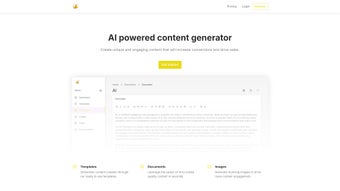
In a world where fresh, high‑quality content is the currency of online success, writers, marketers, and small business owners constantly search for tools that can keep up with demanding publishing schedules. Jotters Pad answers that call with an AI‑powered engine that transforms a simple idea into a polished article, blog post, advertisement, or even a social‑media caption in seconds. What sets Jotters Pad apart is its library of more than 50 ready‑made templates, each crafted to match specific content formats and tones.
Whether you need a long‑form SEO article, a punchy product description, or a captivating email campaign, the platform guides you through a three‑step workflow: choose a template, describe your needs, and let the AI generate a ready‑to‑publish draft. The tool also includes an integrated image generator, allowing you to pair text with eye‑catching visuals without leaving the app. Flexible pricing plans let you scale word limits, document allowances, and image quotas, ensuring that both freelancers on a tight budget and agencies handling large volumes find a suitable tier.
In short, Jotters Pad promises to make content creation effortless, consistent, and affordable—exactly what modern creators need to stay ahead.
Feature‑Rich Toolkit Designed for Every Creator
- 50+ AI‑Driven Templates: From SEO‑friendly articles and blog posts to ad copy, landing pages, and newsletters.
- Three‑Step Generation Process: Select template → Provide description → Receive polished content.
- Integrated Image Generator: Create royalty‑free visuals that match the tone and subject of your text.
- Customizable Word Limits: Choose plans that offer from 5,000 to 250,000 words per month.
- Document & Image Quotas: Allocate a specific number of documents and AI‑generated images per billing cycle.
- Collaboration Mode: Share drafts with teammates, add comments, and export in multiple formats (DOCX, PDF, HTML).
- SEO Optimization Helper: Built‑in suggestions for keywords, meta descriptions, and readability scores.
- Secure Cloud Storage: All generated content is encrypted at rest and in transit, complying with GDPR and CCPA standards.
- Regular Updates & Model Improvements: The AI engine receives monthly fine‑tuning to stay current with language trends.
- Multi‑Language Support: Create content in English, Spanish, French, German, and more, with localized templates.
These features are not just a checklist; they represent a cohesive ecosystem that removes the typical bottlenecks of content production. For example, the SEO Optimization Helper reduces the need for separate keyword research tools, while the Collaboration Mode eliminates endless email threads. The combination of a powerful AI backend with an intuitive front‑end interface means that even users with limited technical expertise can generate professional‑grade copy quickly. Moreover, the secure cloud architecture ensures that confidential drafts—such as product launches or internal reports—remain protected, giving enterprises the confidence to adopt Jotters Pad at scale.
Getting Started: Installation, Compatibility, and Real‑World Pros & Cons
Installation & Usage Instructions
Getting Jotters Pad up and running is intentionally simple. The service is web‑based, so there is no traditional “install” process for desktop operating systems. Follow these steps to start creating instantly:
- Visit the Official Site: Navigate to jotterspad.com and click the “Sign Up” button.
- Create an Account: Register with an email address or use Google/Apple single‑sign‑on for faster onboarding.
- Choose a Plan: Select a free trial or a paid tier that matches your word and image requirements.
- Access the Dashboard: Once logged in, you’ll see the template gallery. Click a template, fill in the prompt field, and press “Generate.”
- Review & Export: Edit the AI‑generated draft if needed, then download in your preferred format or copy directly to your CMS.
For mobile users, Jotters Pad offers native apps for iOS and Android. Download the app from the App Store or Google Play, log in with the same credentials, and you’ll have full access to all templates and the image generator on the go. Desktop users can also install a lightweight Progressive Web App (PWA) that adds an icon to the taskbar and provides offline caching for previously generated content.
Compatibility (itemprop="operatingSystem")
Because Jotters Pad runs in a browser, it is compatible with all major operating systems, including Windows 10/11, macOS Ventura and later, Linux distributions with a modern Chromium‑based browser, as well as iOS 14+ and Android 9+. The PWA works seamlessly on Chrome, Edge, Safari, and Firefox, ensuring a consistent experience regardless of device.
Pros and Cons
- Pros:
- Extensive template library covers most content needs.
- AI generates high‑quality, SEO‑friendly copy with minimal editing.
- Integrated image creation saves time and reduces third‑party costs.
- Scalable pricing suits freelancers, agencies, and enterprises.
- Secure cloud storage and GDPR compliance protect sensitive data.
- Multi‑language support expands global reach.
- Cons:
- Reliance on an internet connection; offline generation is limited.
- Advanced customization may require a learning curve for new users.
- Higher‑tier plans can become pricey for large teams with extensive image quotas.
- AI may occasionally produce repetitive phrasing, necessitating manual polish.
Jotters Pad impresses with its breadth of templates and the seamless integration of AI‑generated images. The platform feels polished, and the security measures are reassuring for enterprise users. While the pricing model is transparent, teams that heavily rely on image generation should monitor their quota to avoid unexpected costs. Overall, it’s a robust solution for anyone looking to accelerate content production without sacrificing quality.
Frequently Asked Questions (FAQ) & Final Thoughts
Is there a free version of Jotters Pad?
Yes, Jotters Pad offers a 7‑day free trial that includes 5,000 words and 10 AI‑generated images. After the trial, you can switch to a paid plan or continue with a limited free tier that provides 1,000 words per month.
Can I export content directly to WordPress or other CMS platforms?
Yes, Jotters Pad includes one‑click export to WordPress, HubSpot, and Drupal via API integrations. You can also copy HTML code or download DOCX/PDF files for manual upload.
How does the AI handle plagiarism concerns?
The AI model is trained on licensed data and generates original text. Jotters Pad also runs an internal plagiarism checker before delivering the final draft, giving you a confidence score for uniqueness.
What security measures protect my data?
All data is encrypted with AES‑256 in transit (TLS 1.3) and at rest. The platform complies with GDPR, CCPA, and ISO‑27001 standards, and offers two‑factor authentication for user accounts.
Can I customize the tone or style of the generated content?
Absolutely. Each template includes tone selectors (e.g., professional, casual, persuasive) and you can add style guidelines in the description field to guide the AI’s output.
Conclusion – Is Jotters Pad Worth the Download?
If you’re looking for a reliable, AI‑driven content engine that combines a massive template library, built‑in image creation, and strong security, Jotters Pad stands out as a top contender in 2025. Its browser‑based nature eliminates compatibility headaches, while the optional mobile apps let you write on the go. The pricing is transparent, and the free trial offers enough functionality to test whether the tool fits your workflow.
For freelancers needing a cost‑effective solution, the entry‑level plan provides ample words and images. For agencies handling multiple client projects, the higher tiers deliver scalability and collaborative features. In short, Jotters Pad streamlines the entire content creation lifecycle—from ideation to publishing—making it a smart investment for anyone serious about producing high‑quality copy quickly.
Ready to boost your productivity? Download Jotters Pad today, start your free trial, and experience how effortless content creation can be.






